
You are using an out of date browser. It may not display this or other websites correctly.
You should upgrade or use an alternative browser.
You should upgrade or use an alternative browser.
Forum logo
- Thread starter BossHogg
- Start date


Viennese Furbabies
Paw Holder
It's a bit small on my phone


Claire W
Paw Holder
- Joined
- Mar 23, 2008
- Messages
- 38,512
- Reaction score
- 32,372
- Points
- 2,915
- Location
- Originally Nottingham
It rotates on iPhone x

Claire W
Paw Holder
- Joined
- Mar 23, 2008
- Messages
- 38,512
- Reaction score
- 32,372
- Points
- 2,915
- Location
- Originally Nottingham
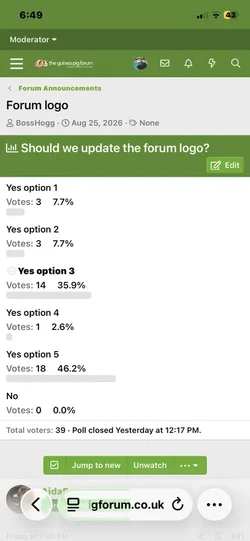
It’s like that for me too on iPhoneView attachment 288467
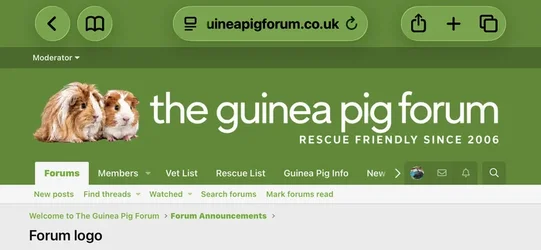
It’s tiny when the phone is portrait
View attachment 288468
And huge when turned landscape. On iPhone.


It stays the same size in portrait and landscape on my phone, running android and TGPF Dark Larger Font, it may mean having to remove all the extra styles and just have a default style which you can toggle between light and dark theme.

I use ‘temporary purple bigger font’.
Logo is small when phone is portrait, but goes large when I turn phone sideways (iPhone)
Logo is small when phone is portrait, but goes large when I turn phone sideways (iPhone)
CTWC
Forum Donator 2026/27
Android it's ok though I've managed until I saw it on here I just thought it was always that small 

- Joined
- Oct 31, 2012
- Messages
- 5,831
- Reaction score
- 10,838
- Points
- 1,900
- Location
- North Dorset, England
It's bigger. On my laptop but stays small on my android mobile on chrome, portrait or landscape the same small size. GPTV style. But I don't mind it's not worth tinkering with as far as I'm concerned, I can still use the forum, so happy days 

Posyrose
Forum Donator 2026/27
- Joined
- Oct 29, 2013
- Messages
- 6,551
- Reaction score
- 9,792
- Points
- 1,625
- Location
- South Manchester/Cheshire
The logo looks fantastic on my laptop - you've done an amazing job. It's much smaller on my android phone, but that's fine.

VickiA
Forum Donator 2026/27

- Joined
- Nov 10, 2009
- Messages
- 54,406
- Reaction score
- 39,521
- Points
- 3,350

Ramia
Forum Donator 2025/26
You must be tinkering because instead of the logo it says xenforo

- Joined
- Nov 27, 2017
- Messages
- 62,226
- Reaction score
- 88,130
- Points
- 3,465
- Location
- East Riding of Yorksire
I noticed that too.You must be tinkering because instead of the logo it says xenforo
Must be the forum gremlins at work

It’s still right on default.
Dark mode has the old logo
All the others the logo has gone entirely
Dark mode has the old logo
All the others the logo has gone entirely

Dark still has the old logo, @MattW can you check I haven't missed something, all the other themes are displaying the new logo, cheers
Large dark mode has the new logo. I have it on my computer, right from the start.
- Joined
- Nov 27, 2017
- Messages
- 62,226
- Reaction score
- 88,130
- Points
- 3,465
- Location
- East Riding of Yorksire
Logo’s back 
Thanks to whoever fixed it
Thanks to whoever fixed it


- Joined
- Nov 27, 2017
- Messages
- 62,226
- Reaction score
- 88,130
- Points
- 3,465
- Location
- East Riding of Yorksire
Thanks Boss 
- Joined
- Nov 27, 2017
- Messages
- 62,226
- Reaction score
- 88,130
- Points
- 3,465
- Location
- East Riding of Yorksire
If the theme selector is the bit at the bottom left that says TGPF - Green, then yes it’s very clear and easy.
I didn’t realise that I could change the appearance like that
I didn’t realise that I could change the appearance like that
Share: