How To Post Photos

sport_billy

Administrator
Staff member
Administrator
Joined
Nov 10, 2009
Messages
54,379
Reaction score
39,485
Points
3,350
We have had a few questions lately on how to post photos in threads or add videos.

So this thread will take you through the various ways in which you can do so.

The following tutorial video shows you how to 'Upload a Photo' in a thread


Sometimes a file will not upload if it is to big, that is because we have to put a limit to avoid it taking up too much of the forum resources, so it can be necessary to reduce the size of the photo you are uploading.
To do this you can use 'Microsoft Paint' software onm your PC or try soemthing like http://www.imageoptimizer.net/Pages/Home.aspx

With Microsoft paint:

Open Paint
paint1.webp

Click File>Open
paint2.webp

Find the Photo you are looking for on your computer using the sidebar to navigate

paint3.webp

Select the photo you want and 'Open' it
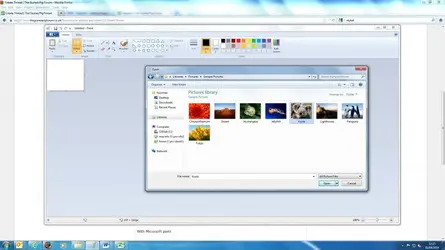
paint4.webp

Once Opened. Select File>Save As. Save it as a new JPEG.
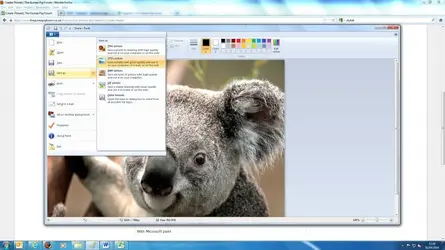
paint5.webp

The file will now be compressed enough to upload using the instructions in the Video.
 
Don't forget to name it something memorable otherwise you'll lose it on your computer, I done that 3 weeks ago, I'm still looking for it as I can't remember what it's called or what folder the new jpeg was saved into!
 
That hasn't worked, have you read our posting photos video? An easy way to do it is click on the photo you want to post and hold the mouse button down, then drag the cursor into the reply box - you should see "move here" then release the mouse button. After a few moments, you should be given the option to post the full image or a thumbnail. :tu:
 
The only thing I can see is go to your video, click on the "direct" button, it will go tellow and show "copied" then come here, in the reply box right click, paste and enter. That will give you a link. When members click on the link, that will take them to your video like my post. ;)
 
Love your video lol :D Thank you, so I don't need to insert the link into the picture or video icon above? I do for pictures, so that's probably why it wasn't working lol :D
 
If you copy and paste the IMG code you will see a photo of the video... click it and it takes you to photobucket e.g Bosshoggs above after pasting IMG code
 
Hello,
I read this to find out the answer too and I am glad you all took the time to answer. The insert image URL put me off a bit as I did not want to join photobucket as I have so many accounts now, however after following Boss Hogs link to photobucket, I do not mind their site at all. That is a pretty fancy car. Must have been time consuming to paint due to all of the taping up to do. Thank you again. Byeee
 
Hello,
I watched the video on how to upload photos and Ta-Dar! It works, or at least I hope it does. This is the hutch I brought my two girls from Bunnngs Hardware in Australia. The wording, ' Upload File" threw me as I thought that would be a Word Doc or PDF file or something like that and not a photo. The photo icon in comments threw me as it took me to photobucket whereas my blog just goes to both options. Thanks again for the advice. Byeee
 

Attachments

  • cavies.webp
    cavies.webp
    17 KB · Views: 8
Hello,
I read this to find out the answer too and I am glad you all took the time to answer. The insert image URL put me off a bit as I did not want to join photobucket as I have so many accounts now, however after following Boss Hogs link to photobucket, I do not mind their site at all. That is a pretty fancy car. Must have been time consuming to paint due to all of the taping up to do. Thank you again. Byeee
Thanks, don't worry about the painting, its all done with adhesive backed high visibility panels which are removed when the patrol car is decommissioned prior to resale. ;)
 
I have an odd question, since I am still fairly new to this fabulous group, is there a limit to the amount of videos uploaded? Twice last night I tried to upload an adorable one of Gus's sheer joy at my returning home, and twice it seemed as if it was good to go, but ultimately, no video? Help, anyone? Thanks!
 
Hi I am still playing about but how do you get pictures on site if only using an iPad...
Don't know if this will help. I had problems because I post from an iPhone what I found was you have to go to a forum, start a new thread And look at the bottom for the "upload file" option. However this doesn't seem to be available on all forums so had to sort of search around
 
I still don't get the option to 'Upload a File' :( I'm on a laptop... :/
 
Just try dragging the photo into the "write your reply" box and release the mouse button, then click on insert full image. ;)
 
Ok will try that.... strange, I've noticed the 'upload a file' button is there when I'm replying to a thread - it's only when I try and create a new thread that the URL thingy appears! :)
 
Nah - won't work - when I try and drag it I get a message on the thread page saying 'uploads not available'..... it's not so bad though... at least I can upload on threads that are already created :)
 
@shorty What an adorable piggy. I am moving your posts to a new thread in Photo's and Videos
 
Would like to post photos but have no URL or attatch button, am working from an ipad,can you help.
 
Back
Top